

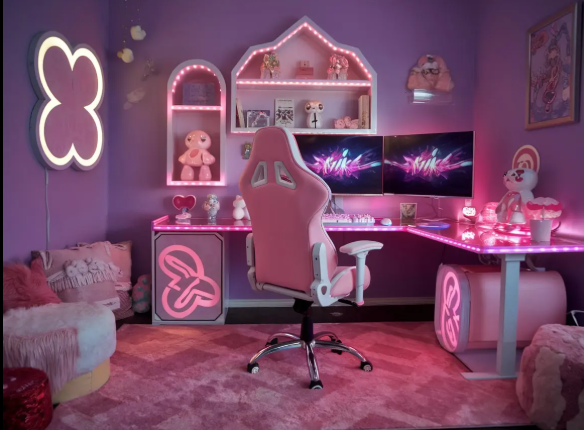
A well-designed gaming room isn’t just about vibes, it’s about staying comfortable, cool, and focused for hours. With powerful PCs acting like little heat engines, good HVAC, smart airflow planning, and an ergonomic layout become just as important as your gear. This guide breaks down how to build a gaming space that keeps you comfortable and your hardware running smooth.
Essentials of Smart Gaming Room Design
A genuinely comfortable gaming room design isn’t just about a good chair and cool lights, it’s about environmental control, ergonomics, and intentional layout. The most overlooked factor is that your body and electronics both behave differently over long sessions, and a well-designed gaming room setup anticipates that.
Ergonomics matter from the start. Adjustable seating, monitor heights that match your eye line, and desk depth that allows your arms to rest naturally keep fatigue away during multi-hour sessions. Your gaming room layout should accommodate movement, not lock you into a single position, because your sitting posture shifts roughly every 12-15 minutes.
Cooling needs to be planned before the gear arrives. High-performance PCs can push small rooms into “mini server rack” territory, so planning HVAC, airflow paths, and vent placement early prevents heat traps. Your body overheats long before your PC does, so keeping the microclimate around you balanced, especially with slightly cooler air directed at your torso and mesh-backed seating that prevents humidity buildup, makes the room comfortable for the long haul. This is a core part of any effective gaming room design.
Lighting and sound shape how long you can play comfortably. Zoned lighting, including bias lighting behind monitors, stabilizes your visual system so your eyes don’t micro-adjust for hours. Soft ambient lighting keeps the room comfortable at night without blowing out contrast. Micro-acoustic treatment and basic sound control remove harsh reflections, reduce echo, and keep the space from feeling fatiguing even if you’re using a headset.
Material choices also matter. Breathable fabrics, minimal plush surfaces that trap heat, and furniture with open-back designs all contribute to cooler, longer-lasting comfort in a gaming room setup.
A great gaming room design feels balanced, comfortable for the human, safe and cool for the hardware. It’s not just about the chair; it’s about avoiding sensory fatigue, thermal fatigue, and postural fatigue simultaneously.
How To Keep A Gaming Room Cool
Gaming setups generate heat the way kitchens do, by stacking multiple “mini heaters” in one place. The solution is treating cooling like a system, not a single gadget. That includes proper air conditioning, not just fans, AC keeps the room’s baseline temperature low so ventilation can actually work. Heat doesn’t build up because the room is hot, it builds up because air stops moving, so cooling only works when air has an exit route. Creating a pressure gradient with slight negative pressure, using a window exhaust fan or a high extraction vent, pulls heat out automatically. Exhaust points should be placed at the highest part of the room since warm air balloons upward and gets stuck, which directly improves ventilation for gaming room setups.
Cross-ventilation matters more than a single fan. One intake fan blowing at your face won’t fix a hot room; you need directional airflow where one side pulls cool air in and the other pushes warm air out. Never use tower fans behind your PC because they recycle hot exhaust right back into the room. This airflow balance is key to both comfort and maintaining safe room temperature for gaming PC performance.
Electronics need breathing space. PC cases, consoles, and subwoofers shouldn’t be crammed into cubbies, leaving 4-6 inches of clearance on all sides keeps air from recirculating and dramatically improves cooling.
Small exhaust or booster fans help remove trapped heat, especially near the ceiling or in warm corners. Closing blinds and keeping vents open also makes a measurable difference, since direct sunlight can raise temperatures by several degrees and closed ceiling vents choke airflow.
Smart thermostats or room-specific sensors catch temperature differences your main thermostat misses. Your house may be at 72°F, while your gaming room silently climbs to 78-80°F during heavy use, another reason to optimize ventilation for gaming room layouts.
A cool room means cool electronics, which means smoother performance and healthier room temperature for gaming PC stability.
How To Prevent PC From Overheating While Gaming
Your PC has its own cooling system, but the room is the “container” that system lives in. If the room stays warm, the PC keeps recycling hot air, like trying to breathe in a sauna. Room airflow matters as much as PC airflow, because a cool room gives your fans cool air to work with. Overheating starts when the PC inhales the heat it just exhaled, which is a placement problem more than a cooling problem.
Keeping room temperature for gaming PC stability in the 68-74°F range prevents the internal CPU/GPU cooling from working overtime. Regular AC maintenance helps keep those temperatures consistent, because clogged filters or weak airflow can make the room drift several degrees warmer during long gaming sessions. Your PC needs a clear intake-exhaust path and should pull cool air from open space, not from behind a monitor or wall. Avoid corner placement and keep it out of the “recirculation zone” behind desks, where temps run 3-8°F hotter. Positioning the case outside that zone eliminates most temperature spikes.
Elevating the case off carpet prevents airflow blockage, and giving the exhaust area 6-12 inches of clearance keeps cables from forming a “heat pillow.” Dust cleaning is essential since dust in gaming room environments blocks fins, fans, and filters, making components run hotter even under light loads.
A cool room, proper placement, and clean airflow paths do more for stability and performance than any single PC fan upgrade.
Optimizing Your Gaming Room Layout for Airflow
Think of your gaming room like a mini data center: gaming room layout determines performance. Hotspots happen because of air stagnation, not because you “didn’t leave enough room.” Electronics should align with the direction of natural airflow, not fight it. When heat sources like PCs, consoles, and AV receivers are grouped on the same wall, the warm air becomes easier to exhaust instead of scattering around the room.
Avoid corners for any major equipment since corners create dead air pockets that trap heat. Moving the desk just 3-6 inches off the wall opens a path for airflow, and those small gaps behind furniture can create venturi effects where air naturally accelerates. Leaving intentional negative space, behind the desk, under the setup, or around gear, prevents hotspots instantly and improves ventilation for gaming room airflow patterns.
Don’t block HVAC vents or windows with furniture. A single blocked vent can raise room temps dramatically, and placing the PC near where cool air enters the room (instead of where warm air exits) keeps it from inhaling its own exhaust. Your seating position should also stay in the room’s cooler zone, not in the PC’s airflow path.
Wall-mounted acoustic panels help reduce stagnant pockets behind furniture, improving both sound and thermal behavior. A well-planned gaming room setup means you’re not fighting heat, you’re directing it.
Must-Have Gaming Room Essentials for Comfort
Heat-free comfort is the sweet spot. The best items improve your body’s comfort without adding thermal load. An ergonomic mesh chair avoids upholstery heat traps and stays breathable during long sessions. LED bias lighting adds eye comfort and atmosphere without warming the room. Microfiber or cotton desk mats stay cool to the touch and reduce sweat, and temperature-neutral fabrics like Tencel or bamboo regulate body heat even better.
Noise-canceling headsets eliminate the need for external speakers that add heat or vibrations. Footrests with airflow gaps and open-frame designs improve circulation and help cool your feet, which can lower overall body temperature by a couple degrees. Pressure-distribution cushions reduce muscular micro-tension so comfort feels effortless, not like you’re adding more tech to fix problems your current tech created.
Fans with wide oscillation move air effectively without overheating the space. Accessories made from metal or glass stay naturally cooler, a simple “cold surfaces” strategy that prevents extra heat transfer to wrists and legs. Overall, the best gaming room essentials reduce the energy your body wastes staying upright, cool, and focused.
Reducing Dust in Gaming Room for Better Cooling
Dust is the silent performance killer in any gaming room. It insulates heat, clogs fans, and triggers allergies, making both the gamer and the hardware uncomfortable. Dust in gaming room setups raises component temperatures by 5-15°C or more, making the room feel stuffy and pushing your PC to work harder. PCs create micro-turbulence zones around their intakes, which pull in dust even from seemingly clean surfaces, and carpets add static that traps fine particles and encourages dust to cling to electronics.
The best dust control is changing airflow patterns, not just cleaning more often. An air purifier with a true HEPA filter keeps dust in gaming room areas from ever reaching PC fans, and keeping windows closed on windy days prevents fine outdoor dust from clogging filters. Hard flooring collects far less dust than carpet and is easier to maintain, especially since carpets generate static. Reducing microfiber furniture or blankets helps too, because they shed fibers your PC inhales like a vacuum.
Cleaning intake filters monthly is essential because PCs and consoles pull air constantly and those filters get dirty fast. Maintaining humidity between 40-55% reduces static, helps dust settle before reaching electronics, and keeps airflow paths cleaner overall.
Improving Airflow With Better Ventilation for Gaming Room
Good cable management is more than an aesthetic flex, it directly affects cooling, safety, and usability. Cables block airflow, create heat traps, and even change pressure zones behind the desk, so routing them vertically instead of horizontally keeps air moving and prevents the exhaust area from getting choked. Under-desk trays, raceways, and furniture with built-in cable cutouts lift cables off the floor and maintain natural airflow behind the setup, an overlooked element of ventilation for gaming room efficiency.
Shortening cable runs helps too; excess loops act like insulation around the PC’s exhaust zone. Angled power connectors keep cables from projecting into airflow paths, and spacing out power bricks prevents their constant low-level heat from building up. Mounting power strips vertically and using a bit of “thermal spacing”, even half an inch between bricks, keeps temperatures far lower.
Separating high-wattage devices across circuits prevents tripped breakers and reduces outlet heat, and labeling every power brick and plug saves you future headaches by making everything safer and easier to manage.
A clean cable setup is a cool, safe, and high-performance one, an essential part of any smart gaming room layout and well-designed gaming room setup.
